Written by Donna
Affiliate marketing researcher and founder of AffiliateEducationForBeginners.com.
This guide is part of my AI Tools for Affiliate Marketing Beginners hub.
Choosing an email platform can feel complicated when every company promises smarter automation and better results. AI email marketing tools can help affiliate beginners draft emails, brainstorm subject lines, organize subscribers, and build simple automated sequences—but they cannot replace your judgment, earn a reader’s trust, or guarantee clicks and commissions.
The best tool is not necessarily the one with the longest feature list. It is the one that fits your audience, budget, current list size, and the kind of emails you are ready to send.
In this guide, we’ll compare practical options, look at what their AI features actually do, and build a simple workflow you can use without handing your entire message over to automation.
I research tools by checking their current official features, intended users, and limitations. When I have not personally tested a feature, I will identify the information as research rather than present it as firsthand experience.
This guide focuses on permission-based emails for people who have chosen to hear from you. It does not teach unsolicited cold-email outreach or promise that an AI-generated campaign will produce income.
Affiliate disclosure: This guide may contain affiliate links. If you purchase through one of my links, I may earn a commission at no additional cost to you.
What Can AI Email Marketing Tools Help You Do?
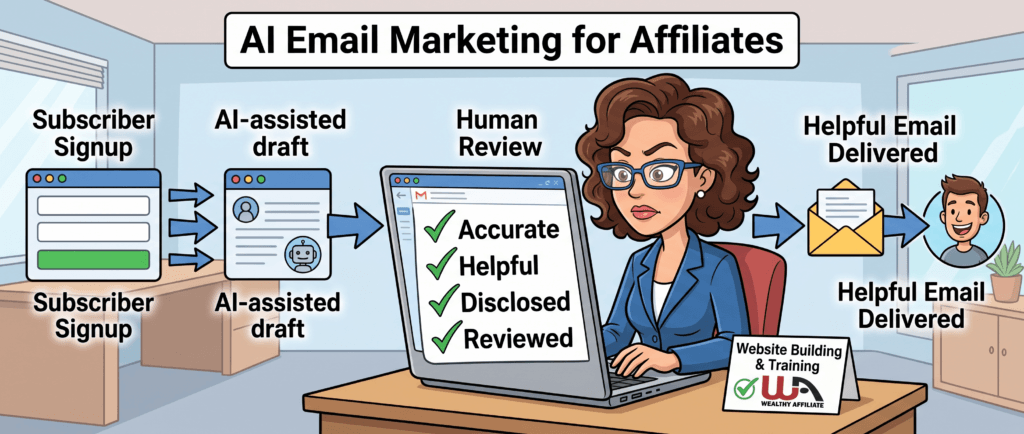
AI email marketing tools can help you move from a blank page to a workable draft, organize basic email sequences, and analyze campaign information. They assist with the work; they do not decide what your audience needs or make an email trustworthy.
For a beginner, useful AI-assisted tasks can include:
- Suggesting subject-line ideas
- Creating a first draft from your instructions
- Rewriting a complicated paragraph in simpler language
- Organizing a welcome sequence into a logical order
- Suggesting audience segments based on information you already collected
- Summarizing campaign results so you know what to investigate
Imagine that someone subscribes after reading your guide about choosing an affiliate program. An AI assistant could help you outline three welcome emails:
- Deliver the resource the subscriber requested.
- Explain one common beginner mistake.
- Link to a relevant guide that helps with the next decision.
You still need to check every draft. AI can produce incorrect claims, awkward personalization, repetitive wording, and recommendations that do not fit the reader.
It also cannot determine whether you have permission to email someone, whether your affiliate program allows a particular promotion, or whether your disclosure is adequate. Those decisions remain your responsibility.
If you need help with AI-assisted writing beyond email, read AI Writing Tools for Affiliate Marketing Beginners.
Beginner takeaway: Start with one useful email and one clear reader need. Automation becomes helpful after you understand what you are trying to communicate.
Which AI Email Marketing Tool Is Best for a Beginner?
There is no single best AI email marketing tool for every affiliate beginner. MailerLite and Kit are approachable options for creators building a simple newsletter, GetResponse offers broader campaign and automation features, and HubSpot may suit a business that also needs a customer relationship management system.
I have not personally tested every feature in these platforms. This comparison is based on their current official product information, not on commissions, sponsored placement, or an income result I achieved with them.
| Tool | A Practical Fit For | AI and Automation Help | Important Limitation |
|---|---|---|---|
| MailerLite | Beginners wanting newsletters, landing pages, and straightforward automation | AI-assisted writing, subject-line suggestions, email editing, and automated workflows | Some features depend on the selected plan; verify what is included before joining |
| Kit | Bloggers and creators who want to build a subscriber list and send content-based emails | Email sequences, visual automation, subscriber organization, and creator-focused publishing tools | Kit is the new name for ConvertKit; its available features vary by plan |
| GetResponse | Beginners who want email marketing, landing pages, and broader automation in one platform | AI-assisted email and subject-line drafting, campaign creation, automation, and analytics | The larger feature set may be more than a new affiliate needs, and AI features can be plan-dependent |
| HubSpot | Businesses that want email connected to a CRM, contacts, and other marketing activities | AI-assisted email creation, personalization, audience selection, automation, and customer data | Its broader system can feel complicated if you only need a simple newsletter |
Why Instantly Is Not Included in This Beginner List
Instantly is primarily designed for cold-email outreach, lead generation, sales engagement, and deliverability management. That is different from sending permission-based educational emails to readers who subscribed through your affiliate website.
A tool can be useful for its intended audience without being the right recommendation for this article.
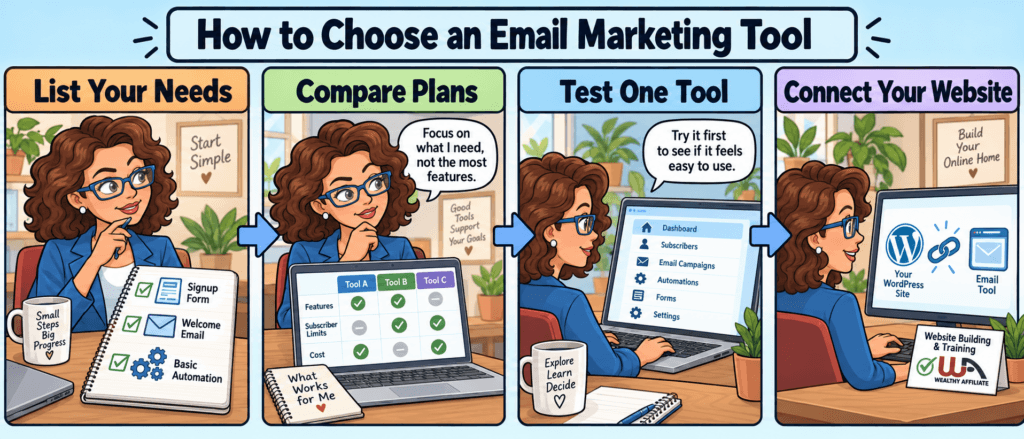
How I Would Narrow the List
If I were choosing a tool for a new affiliate website, I would ask:
- Can I create a signup form and send a simple welcome sequence?
- Is the interface manageable at my current skill level?
- What will it cost at my expected number of subscribers?
- Which AI features are actually included in the plan I’m considering?
- Can I export my subscriber list if I change platforms?
- Does the platform provide the consent, unsubscribe, and reporting features I need?
- Will it connect with my WordPress website and other tools?
Features and prices change, so use this comparison as a shortlist—not as a substitute for checking each provider’s current plan details.
My beginner recommendation: Try the interface before building a complicated automation. The tool should make your first useful sequence easier to manage, not give you another system you are afraid to touch.
How to Use AI Email Tools in Your Affiliate Strategy
A beginner-friendly email strategy starts with permission, one useful promise, and a short welcome sequence. AI can help organize and draft the emails, but you decide what the subscriber needs and approve every message before it is sent.
You do not need a complicated funnel to begin. Start with one reason for someone to join your list.
For example, an affiliate website for first-time hikers might offer a printable checklist called “What to Pack for Your First Day Hike.” Someone who requests that checklist has shown interest in beginner hiking information—not permission for an endless stream of unrelated product promotions.
Step 1 — Decide What the Subscriber Asked For
Write one sentence explaining why someone joined your list:
“This subscriber requested a beginner hiking checklist and wants practical guidance about preparing for a first hike.”
That sentence gives the AI tool useful context and helps you avoid writing generic emails.
Step 2 — Outline a Three-Email Welcome Sequence
A simple sequence could include:
- Deliver the promised resource. Give the subscriber what they requested and explain how to use it.
- Help with one related problem. Answer a common question or point out a beginner mistake.
- Offer the next useful guide. Link to an article that continues the lesson and mention a relevant product only when it naturally helps.
The purpose is not to force a sale within three emails. It is to show the subscriber what kind of help they can expect from you.
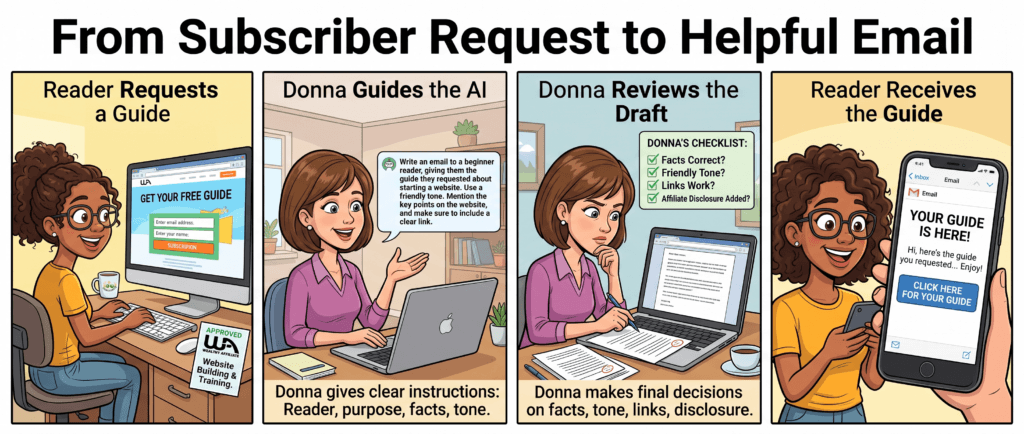
Step 3 — Give AI Specific Instructions
Instead of asking, “Write me a marketing email,” provide the audience, purpose, facts, tone, and boundaries.
A better prompt would be:
“Draft a friendly welcome email for a first-time hiker who requested my day-hike packing checklist. Deliver the checklist first, explain one way to use it, and invite the reader to view my beginner footwear guide. Do not promise results or invent personal experience. Leave a placeholder for my affiliate disclosure.”
AI usually produces a more useful starting point when you explain what the email should accomplish and what it must avoid.
Step 4 — Review the Draft as a Human
Before sending, check:
- Does it deliver what the subscriber expected?
- Are every claim and product detail accurate?
- Does it sound like something I would genuinely say?
- Did the AI invent an experience, result, or customer story?
- Is the affiliate relationship clear where needed?
- Does every link lead to the intended page?
- Can the reader easily unsubscribe?
My experience improving this website has reinforced the importance of that last review. I have found outdated links and wording that looked acceptable until I checked it carefully. An automated email can repeat the same mistake to an entire list, so review matters before—not after—you press send.
Step 5 — Measure One Useful Response
Open rates can provide context, but they do not tell you whether the email genuinely helped someone. Also look at relevant link clicks, replies, unsubscribes, and whether readers continue to the guide you recommended.
Use those signals to improve one part of the sequence. Do not let an AI-generated score persuade you to change everything at once.
Practical takeaway: Let AI speed up drafting and organization. Keep the audience, facts, recommendations, and final approval in human hands.
Need a Website Before You Build an Email List?
An email tool can help you communicate with subscribers, but you still need a trustworthy place where people can discover your content and decide whether they want to hear from you.
I use Wealthy Affiliate for this website’s hosting, website-building resources, training, and Site Support. I do not use it as the email-sending platform described in this guide.
If you’re still building that foundation, you can explore Wealthy Affiliate’s free starting option and decide whether its approach fits the way you want to learn.
Affiliate disclosure: If you purchase a paid Wealthy Affiliate membership through my link, I may earn a commission at no additional cost to you.
Explore Wealthy Affiliate’s Website-Building Platform
Training and tools do not guarantee traffic, subscribers, or affiliate income. They give you a place to learn and practice the work.
How AI Email Tools Fit Into Your Affiliate Website
An email platform is one part of your affiliate system. Your website attracts and educates readers, your signup form invites permission to stay in contact, and your emails help interested subscribers continue learning.
Here is how the pieces connect:
- A reader discovers a helpful article on your website.
- The article offers a relevant resource or reason to subscribe.
- The subscriber receives the promised resource and a short welcome sequence.
- Later emails direct the reader to useful articles that match their interests.
- Analytics help you see which links readers choose and where the sequence may need improvement.
AI can assist at several points, but each tool has a different job:
- AI Writing Tools can help you develop and revise a draft.
- AI Analytics Tools can help summarize campaign information and identify questions worth investigating.
- AI Chatbots can answer basic website questions when they are carefully configured and monitored.
- Affiliate SEO for Beginners explains how useful website content can become discoverable through search.
These tools should support one connected reader journey. Adding more software does not repair an unclear offer, weak content, or an email the subscriber never requested.
You can return to the AI Tools for Affiliate Marketing Beginners hub for the broader learning path.
A simple test: Can you explain what each tool contributes in one sentence? If two tools do the same job—or neither solves a problem you currently have—you may not need both.
Common AI Email Marketing Mistakes to Avoid
The biggest mistake is treating automation as permission to stop paying attention. AI can produce a polished-looking email that is inaccurate, poorly timed, or completely wrong for the subscriber.
Sending Emails People Did Not Request
A person visiting your website has not automatically agreed to receive marketing emails. Explain what someone will receive before they subscribe, and use your email platform’s consent and unsubscribe features.
A better approach: Connect the signup offer to the email sequence. Someone who requests an SEO checklist should receive information related to SEO—not an immediate series of unrelated product promotions.
Sending the First AI Draft
AI can invent product features, prices, experiences, statistics, and customer results. It may also create vague language that sounds professional without saying anything useful.
A better approach: Verify every factual claim, open every link, remove invented experience, and rewrite the message in your own voice before sending it.
Promoting Too Much, Too Soon
If every email pushes a product, subscribers have little reason to keep opening them. A sequence should help the reader make progress, not simply repeat an affiliate link.
A better approach: Deliver the promised resource first. Teach something useful, link to relevant educational content, and recommend a product only when it fits the question being discussed.
Adding Personalization Without Understanding It
A first-name field can make an email feel personal, but it can also create awkward messages when subscriber information is missing or incorrect. More advanced AI personalization can introduce additional accuracy and privacy concerns.
A better approach: Begin with simple segmentation based on what the subscriber requested or selected. Test fallback text so an empty field does not produce “Hello, First Name.”
Watching Only Open Rates
Open-rate data can be useful, but it is not a complete measure of trust or usefulness. Privacy features and image blocking can also affect how opens are recorded.
A better approach: Consider relevant clicks, replies, unsubscribes, and whether readers continue to the resource you intended to help them find.
Buying Several Tools Before Sending One Email
Comparing software can feel productive, but a larger tool collection does not create a clearer message.
A better approach: Choose one platform that can collect subscribers, send a welcome email, and provide an unsubscribe option. Learn that basic process before paying for advanced automation.
I approach these decisions the same way I approach changes to this website: identify the specific problem, make one change, check what happened, and avoid claiming a result the evidence does not support.
For broader beginner guidance, read Mistakes to Avoid When Starting Affiliate Marketing.
How to Use AI Email Tools Responsibly
Responsible AI email marketing means sending accurate messages to an appropriate audience, making commercial relationships clear, protecting subscriber information, and giving people a working way to stop future emails. AI does not take those responsibilities away from the sender.
I prefer a permission-based approach: tell people what they are signing up for and email them because they chose to hear from you. That builds clearer expectations even when a particular law may use a different standard.
Keep Your Sender Information Honest
Your sender name, email address, and subject line should accurately represent who sent the message and what it contains. Avoid subject lines that create false urgency or disguise a sales message as a personal reply.
Include a Working Unsubscribe Method
Commercial emails should provide a clear way for recipients to opt out. Test the link yourself and make sure your email platform processes requests correctly.
The Federal Trade Commission’s CAN-SPAM compliance guide explains that U.S. commercial emails must include a valid physical postal address and a functioning opt-out method. The FTC says opt-out requests must be honored within 10 business days.
A registered post office box or qualifying private mailbox may satisfy the physical-address requirement, so you do not necessarily have to publish your home address.
Disclose Affiliate Relationships Clearly
If an email contains an affiliate recommendation, readers should understand that you may earn money if they purchase through the link.
Do not rely on the words “affiliate link” alone. The FTC explains that some readers may not understand what that phrase means.
Use plain language near the recommendation, such as:
“If you purchase through this link, I may earn a commission at no additional cost to you.”
You can read the FTC’s Endorsement Guides for affiliates and content creators for additional guidance.
Protect Subscriber Information
Use subscriber data only for purposes people would reasonably expect based on what you told them. Avoid pasting private subscriber information into a separate AI tool unless you understand how that provider stores and uses the data.
Collecting less information can make the first setup easier. An email address and an optional first name may be enough for a simple beginner newsletter.
Check More Than U.S. Requirements
Email and privacy rules vary by location. Your subscribers may live outside the United States even when your website is based there. Check the requirements that apply to your business and audience, and seek qualified legal advice when needed.
This section provides general educational information, not legal advice.
Before sending: Confirm the recipient’s expectation, verify the content, include the required sender information and unsubscribe method, and make any financial relationship easy to understand.
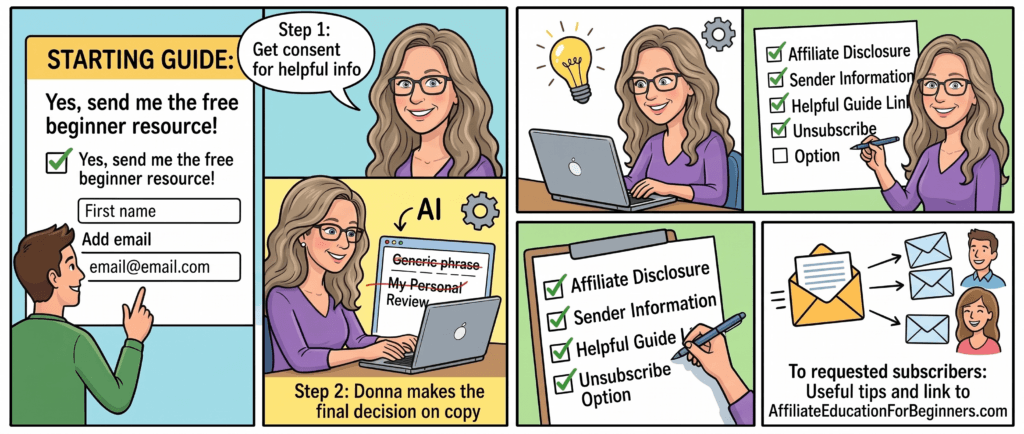
A Simple AI Email Marketing Plan for Beginners
Your first goal is not to build a large automated funnel. It is to create one useful signup offer and one accurate welcome email that works from beginning to end.
Step 1 — Choose One Reader and One Need
Identify who the email is for and why that person would want it.
Example:
“This is for a beginner affiliate who wants a checklist for reviewing a program before applying.”
Step 2 — Create the Promised Resource
Make the checklist, short guide, template, or lesson you offered. It does not need to be long, but it should solve the problem described on the signup form.
Step 3 — Choose One Email Platform
Use the comparison above to create a shortlist. Check the current plan details, test the editor, and confirm that the platform can create a signup form, send an automated welcome email, and process unsubscribes.
Step 4 — Draft the Welcome Email
Give the AI tool clear instructions about the reader, purpose, facts, tone, and boundaries. Treat its response as a draft—not finished content.
Step 5 — Review and Test Everything
Send the email to yourself before activating the sequence. Check:
- Sender name and subject line
- Spelling and formatting
- Mobile readability
- Download and internal links
- Affiliate disclosure
- Physical postal address
- Unsubscribe link
Step 6 — Invite a Small Number of Real Subscribers
Add the signup form to one relevant article instead of placing it across the entire website immediately. Confirm that subscribers receive what was promised.
Step 7 — Improve One Part at a Time
Look at replies, relevant clicks, unsubscribes, and any delivery problems. Use that information to improve one email or one signup page before adding a complicated sequence.
When I make changes to this website, I get better information by testing a specific change than by changing several systems at once. The same principle applies here: build a simple path, check that it works, and expand only when you understand what needs improving.
Your first action: Write one sentence describing the reader and resource for your initial signup offer.
Continue Learning About AI for Affiliate Marketing
Choose the guide that matches your next task instead of opening every AI tool at once.
Previous step — Learn how to create and review a draft
AI Writing Tools for Affiliate Marketing Beginners
Use this guide if you need help giving AI better instructions and turning its output into accurate, useful content.
Next step — Understand the information your campaign produces
Using AI to Analyze Affiliate Performance Data
Read this after you have real campaign information and want help identifying patterns without assuming that an AI summary is automatically correct.
Supporting hub — See how the AI guides connect
AI Tools for Affiliate Marketing Beginners
Return to the hub when you are ready to choose another part of the AI learning path.
Want Help Building the Website Behind Your Email List?
Before someone can subscribe, they need a useful reason to visit and trust your website.
I use Wealthy Affiliate for this website’s hosting, training, website-building resources, and Site Support. It is not the email-sending platform compared in this guide, but it can support the website and learning foundation behind an affiliate email strategy.
You can explore the free starting option, look through the platform, and decide whether it fits your needs before considering a paid membership.
Affiliate disclosure: If you purchase a paid Wealthy Affiliate membership through my link, I may earn a commission at no additional cost to you.
Explore Wealthy Affiliate’s Free Starting Option
No platform guarantees website traffic, email subscribers, or affiliate income. Your results depend on the audience you serve, the work you complete, and the decisions you make.
Key Takeaways
- AI email marketing tools can help with drafting, subject-line ideas, organization, automation, and campaign analysis.
- AI-generated content still requires human review for accuracy, tone, links, disclosures, and invented claims.
- The best beginner tool depends on your audience, budget, list size, experience, and the features included in the plan you choose.
- MailerLite and Kit may suit creators seeking a simpler newsletter workflow; GetResponse offers broader campaign tools; HubSpot connects email with a larger CRM system.
- Instantly focuses primarily on cold outreach and sales engagement, which is different from the permission-based subscriber strategy covered here.
- Begin with one useful signup offer and one tested welcome email before building a longer automated sequence.
- Make subscriber expectations, affiliate relationships, sender information, and unsubscribe options clear.
- Email software and AI assistance do not guarantee subscribers, clicks, commissions, or income.
The goal is not to automate as much as possible. It is to create a manageable system that helps the right reader receive useful information—and keeps you responsible for what is sent.
Frequently Asked Questions
What is the best AI email marketing tool for a beginner?
There is no single best choice for everyone. MailerLite and Kit may suit creators who want a relatively simple newsletter workflow. GetResponse offers broader campaign and automation tools, while HubSpot may fit a business that also needs a CRM. Compare current features, plan limits, usability, and subscriber costs before choosing.
Can I use ChatGPT to write affiliate emails?
You can use ChatGPT to help outline, draft, simplify, or revise an email. Give it clear information about the audience, purpose, facts, tone, and boundaries. Review every result for inaccurate claims, invented experiences, unsuitable recommendations, and missing disclosures before sending it.
Do I still need an email marketing platform if I use AI?
Yes. A separate AI writing assistant can help create text, but an email marketing platform manages signup forms, subscriber records, sequences, delivery, unsubscribes, and campaign reporting. Some email platforms include their own AI features, so check what your chosen plan already provides before adding another tool.
Can AI improve my email open rates and affiliate commissions?
AI can suggest subject lines, organize drafts, and help analyze campaign information, but it cannot guarantee opens, clicks, commissions, or income. Results also depend on subscriber expectations, deliverability, timing, relevance, trust, and the value of the email itself.
Do affiliate links in emails need a disclosure?
Readers should clearly understand when you may earn money from a recommendation. Use plain language near the affiliate recommendation, such as: “If you purchase through this link, I may earn a commission at no additional cost to you.” Check the rules of your affiliate program and the requirements that apply to your business and audience.
Can I start AI email marketing for free?
You may be able to test free plans, trials, or limited AI tools, but allowances and features change. Check subscriber limits, automation access, AI usage limits, branding, sending limits, and what happens when a trial ends. A free starting option does not mean every feature will remain free as your list grows.
About the Author
Written by Donna
Affiliate marketing researcher and founder of AffiliateEducationForBeginners.com.
I research beginner affiliate marketing tools by checking current provider information, comparing how each tool fits into a real website workflow, and separating verified features from promotional claims.
My hands-on experience includes building and maintaining this WordPress website, organizing its learning hubs, improving internal links, checking pages in Google Search Console, and using Wealthy Affiliate for hosting, training resources, and Site Support.
I have not personally tested every email platform or AI feature compared in this guide. Where my discussion is research-based, I say so rather than presenting it as personal experience.
My goal is to help beginners understand what a tool can realistically do, what still requires human judgment, and what to verify before paying for a service.
Learn more about Donna or read my Editorial Policy.
Disclaimer
This article is for educational purposes and does not provide legal, financial, or guaranteed income advice. Email marketing, privacy, disclosure, and affiliate-program requirements can vary by location and provider. Check the rules that apply to your business and audience.
Tool names, features, plans, limits, and prices can change. Confirm current information on each provider’s official website before choosing or purchasing a service.
This article may contain affiliate links. If you purchase through one of my links, I may earn a commission at no additional cost to you. Read my Affiliate Disclosure for more information.
AI and email software do not guarantee delivery, subscribers, traffic, clicks, commissions, or income.